
Apple iMac M6: Features, Specifications & Buying Guide
Nov
The Apple iMac M6 (2026) brings Apple’s latest desktop computing technology to its iconic 24-inch all-in-one design.
Powered by the M6 chip, the new iMac combines a 4.5K Retina display, advanced AI acceleration, Wi-Fi 7, a 12MP Center Stage camera and macOS 27 in a remarkably slim desktop computer.
For designers, students, businesses and home-office users in Lebanon, the iMac M6 offers a powerful alternative to traditional desktop setups that require separate monitors, speakers and webcams.
But should you choose the 10-core or 12-core configuration? And is the new M6 worth upgrading to from an older iMac?
This buying guide explains the key differences, specifications and best use cases.
Apple iMac M6 2026: Quick Overview
Apple announced the iMac M6 on October 27, 2026, with availability beginning November 6 in launch markets.
- Processor: Apple M6 chip.
- Configurations: 10-core CPU/GPU or 12-core CPU/GPU.
- Display: 24-inch 4.5K Retina.
- Resolution: 4480 × 2520 pixels.
- AI: Dual 16-core Neural Engine.
- Wireless: Wi-Fi 7 and Bluetooth 6.
- Camera: 12MP Center Stage.
- Operating System: macOS 27.
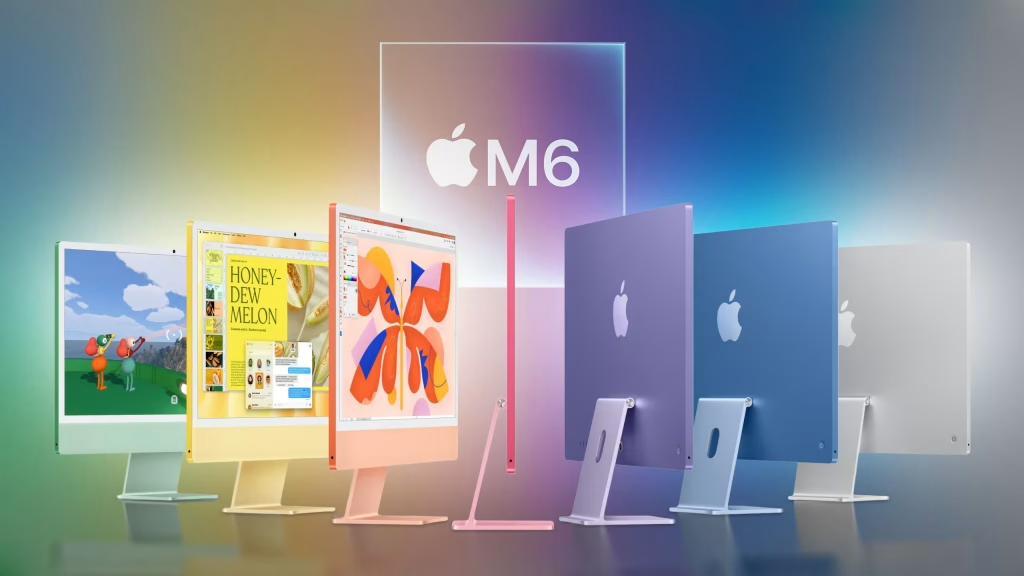
- Colors: Blue, Green, Pink, Yellow, Purple, Orange and Silver.
Explore the Apple iMac collection in Lebanon to compare desktop configurations.
1. Apple M6 Chip: A New Generation of Desktop Performance
The M6 chip delivers improved processing and graphics performance for productivity, creative applications and AI-powered workflows.
CPU and Multitasking
The new iMac is designed for everyday tasks such as browsing, office applications, presentations, spreadsheets and video calls.
It also provides the processing capability required for more demanding work, including photo editing, compatible video production and software development.
GPU and Creative Applications
The integrated GPU includes Neural Accelerators that support advanced graphics and AI-related workloads.
Users working with large images, visual content and demanding creative applications can benefit from the improvements in Apple’s latest chip architecture.
AI Performance
Apple reports up to five times faster on-device AI performance than the M4 iMac in selected tests.
Actual performance varies by workload, configuration and software.
2. iMac M6 10-Core vs 12-Core: What’s the Difference?
Apple offers two principal M6 configurations with different processing capabilities and connectivity options.
| Feature | M6 10-Core | M6 12-Core |
|---|---|---|
| CPU | 10 cores | 12 cores |
| GPU | 10 cores | 12 cores |
| Display | 24-inch 4.5K | 24-inch 4.5K |
| Thunderbolt / USB 4 | 2 ports | 4 ports |
| External Displays | Up to 1 | Up to 2 |
| 2.5Gb Ethernet | Optional | Included |
| Nano-Texture Display | Not offered | Optional |
| Best For | Home, study and general office | Creative and demanding workflows |
Choose the iMac M6 10-Core If…
You mainly use your computer for office work, studying, browsing, presentations, business administration and general creative tasks.
Explore the Apple iMac M6 10-Core product page for specifications and availability.
Choose the iMac M6 12-Core If…
You need more processing and graphics capability, additional Thunderbolt ports or support for more external displays.
Explore the Apple iMac M6 12-Core product page for its configuration options.
3. 24-Inch 4.5K Retina Display
The iMac M6 features a 24-inch 4.5K Retina display with a resolution of 4480 × 2520 pixels.
Why Is the Retina Display Important?
The high pixel density helps display sharp text, detailed images and precise visual elements.
Its P3 wide color support and True Tone technology also make the display attractive for photography, design and multimedia work.
Is the iMac M6 Good for Graphic Design?
Yes. Its high-resolution display and powerful integrated graphics make it a strong option for compatible design and photo-editing applications.
Professional users should still evaluate color-management requirements and software compatibility for their particular workflow.
For larger workspaces, browse Apple displays to compare additional monitor options.
4. Apple Intelligence and macOS 27
The iMac M6 combines Apple’s latest processor with macOS 27 and supported Apple Intelligence capabilities.
AI Features for Productivity
Compatible AI-powered tools can assist with writing, organizing information, image processing and supported everyday workflows.
AI for Developers and Creators
The M6 architecture can accelerate compatible machine learning models and AI-assisted creative applications.
Availability and performance depend on the software, language, region and individual feature requirements.
5. Camera, Microphones and Speakers
The iMac M6 includes several features that make it suitable for modern communication and remote work.
- 12MP Center Stage camera.
- Desk View support.
- Three-microphone array.
- Six-speaker sound system.
- Spatial Audio support.
These integrated features reduce the need for separate accessories for many everyday video meetings and multimedia tasks.
6. iMac M6 vs iMac M4: Should You Upgrade?
The iMac M6 introduces improved processing capabilities, AI acceleration and newer wireless connectivity compared with the M4 generation.
Reasons to Consider Upgrading
- You regularly run demanding creative applications.
- You need improved AI processing performance.
- You want Wi-Fi 7 and Bluetooth 6.
- Your current iMac struggles with large projects.
- You need newer connectivity options.
When Keeping Your M4 Makes Sense
If your current iMac M4 comfortably handles your workload, upgrading immediately may not be necessary.
The M4 remains a capable computer for office productivity, creative work and everyday tasks.
Compare the Apple iMac M4 24-inch with the newer M6 generation before making a decision.
7. Who Should Buy the Apple iMac M6?
Students and Home Users
The iMac M6 provides a complete desktop experience for studying, browsing, communication and multimedia.
Graphic Designers and Photographers
The Retina display and M6 graphics capabilities make it attractive for photo editing, visual design and other compatible creative workflows.
Businesses and Offices
The integrated display, camera, microphones and speakers make the iMac practical for professional desks, meeting rooms and administrative workstations.
Developers
Developers who prefer a stationary desktop can use the iMac M6 for coding, testing and compatible local development workflows.
However, memory and storage requirements should be considered carefully before choosing a configuration.
8. iMac M6 vs MacBook Pro M6: Desktop or Laptop?
The decision between an iMac and MacBook Pro is primarily about how and where you work.
Choose iMac M6 When…
- You work mainly from one desk.
- You want an integrated high-resolution display.
- You prefer a complete desktop setup.
- You want a clean workspace with fewer separate components.
Choose MacBook Pro M6 When…
- You frequently travel or work remotely.
- You need a portable professional computer.
- Battery operation is important.
- You move between different workspaces.
Explore the Apple MacBook Pro collection to compare portable alternatives.
9. Buying an Apple iMac M6 in Lebanon
Before purchasing an iMac M6, compare the exact configuration and your intended workload.
Important considerations include:
- 10-core versus 12-core processor.
- Unified memory capacity.
- SSD storage.
- Number of Thunderbolt ports.
- External display requirements.
- Color preference.
- Warranty and after-sales terms.
- Current local availability.
Browse Apple products at DSLR Zone or explore the broader computers category for alternative desktop systems.
You can also browse computer peripherals for compatible workspace accessories.
Frequently Asked Questions About Apple iMac M6
When was the Apple iMac M6 released?
Apple announced the iMac M6 on October 27, 2026, with availability beginning November 6 in launch markets.
What is the difference between iMac M6 10-Core and 12-Core?
The 12-core configuration offers more CPU and GPU cores, additional Thunderbolt ports, greater external display support and other configuration options.
Is the iMac M6 good for video editing?
Yes. The M6 chip and high-resolution display make it suitable for compatible video-editing workflows. Performance depends on project complexity and configuration.
Does the iMac M6 support Apple Intelligence?
Yes. It supports compatible Apple Intelligence features through macOS 27, subject to regional, language and software requirements.
Does the iMac M6 come with a keyboard and mouse?
Yes. Apple includes a color-matched Magic Keyboard and Magic Mouse. Keyboard features vary by configuration.
How many colors does the iMac M6 come in?
The iMac M6 is offered in seven colors: Blue, Green, Pink, Yellow, Purple, Orange and Silver.
Where can I find an Apple iMac M6 in Lebanon?
DSLR Zone lists both the 10-core and 12-core iMac M6 models. Check the product pages for current availability and configuration details before purchasing.
Final Verdict: Apple iMac M6 2026 in Lebanon
The Apple iMac M6 combines modern processing performance, advanced AI capabilities and a high-resolution display in an elegant all-in-one desktop.
The 10-core configuration is an attractive option for home users, students and general office work.
The 12-core configuration provides additional processing capability and connectivity for users with more demanding requirements.
For anyone planning to upgrade an older desktop computer in Lebanon, the iMac M6 deserves consideration alongside the previous M4 generation and Apple’s portable MacBook lineup.
Explore the Apple iMac collection at DSLR Zone Lebanon and compare available configurations.