

Apple Magic Keyboard with Touch ID and Numeric Keypad (USB-C)
Price range: $269 through $295
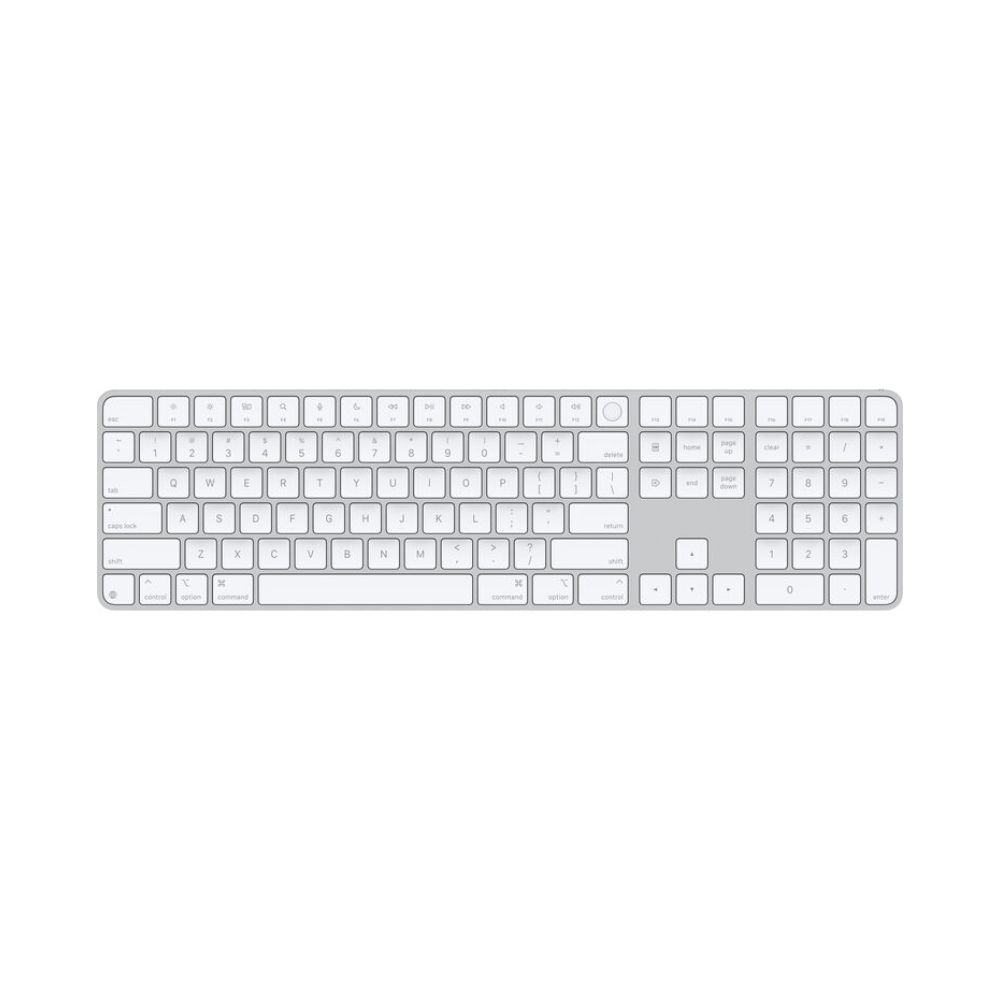
The Apple Magic Keyboard with Touch ID and Numeric Keypad (USB-C, White Keys) is a premium, extended wireless input solution for Apple silicon Mac models. Featuring a built-in Touch ID sensor for instant biometric logins and purchases, it features a full numeric keypad and dedicated document navigation controls ideal for spreadsheets and developer layouts. Now updated with a modern USB-C charging port, it delivers a comfortable, scissor-mechanism typing experience, pairs automatically with your Mac, and features an internal battery that lasts for a month or more between charges.

delivery all over lebanon
Immediate Same-Day Dispatch for Beirut

After Sales Services
Premium Care That Doesn’t End at the Checkout

Cash on Delivery payments
Pay Only When You Receive Your Order

Zalka Highway Flagship Store
Your Premier Destination for Genuine Tech

Free Delivery over 350$
Shop Risk-Free and Save on Shipping Costs
Seamless Productivity, Flawless Security: Apple Magic Keyboard with Touch ID
Elevate your desktop workflow with the absolute standard in pro-tier input design. The Apple Magic Keyboard with Touch ID and Numeric Keypad transitions to a modern, universal USB-C platform, offering a highly precise, exceptionally stable typing experience. This extended wireless desktop layout is custom-engineered for users who value rapid alphanumeric entry, fluid interface navigation, and airtight biometric authentication.
Finished in a premium, ultra-clean silver aluminum housing with vibrant white keys, it brings Apple’s signature minimalist design aesthetic to your workspace. Whether you are adjusting complex financial records, building large data sets, or configuring local development environments, this keyboard anchors your desk with uncompromised design and performance.
Instant Secure Enclave Touch ID and Premium Scissor Mechanism
Take the friction out of your daily digital checkpoints. Positioned subtly in the upper-right corner of the layout is an advanced Touch ID biometric sensor. Communicating directly with the Secure Enclave processor inside your Apple silicon computer, it enables instant, hardware-encrypted user logins, swift system credential authorization, and secure one-touch Apple Pay transactions with a simple tap of your finger.
Every single keycap is anchored by Apple’s highly responsive, low-profile scissor mechanism. This refined engineering optimizes key travel, reduces wobbling, and ensures balanced, crisp tactile response across the entire board. The result is a remarkably comfortable, whisper-quiet typing experience that allows you to fly through lines of code, ad copy, or content editing loops without finger fatigue.
Extended Numeric Keypad Matrix and Dedicated Navigation Array
Built to maximize efficiency during intensive analytical and database workflows, this extended keyboard array eliminates the need for separate desktop number pads. It incorporates a comprehensive numeric keypad that dramatically accelerates data logging, spreadsheet management, and numerical calculations.
The spacious layout also integrates a dedicated set of document navigation controls:
Full-Sized Arrow Cluster: Offers independent, standard-sized inverted-T arrow keys—providing immediate tactile location for precise code crawling, document jumping, or casual desktop gaming.
Dedicated Navigation Stack: Features standalone keys for fast page scrolling, document top/bottom tracking, and quick contextual menu skips.
Dedicated Media Keys: Grants instant, tactile control over system volume, brightness adjustments, audio playback pauses, and full-screen window views.
Modern USB-C Unified Charging and Month-Long Power Cell
Say goodbye to legacy cable clutter. This updated model discards older connection styles for a universal USB-C charging port. Now, you can use the same high-quality cable that powers your professional laptop, pro camera gear, or audio devices to charge your primary input method. The box comes complete with a premium, durable woven USB-C to USB-C cable for quick charging and effortless system pairing.
The internal, high-capacity lithium-ion power cell delivers impressive, long-lasting wireless endurance. It keeps the keyboard running continuously for about a month or more on a single full charge, allowing you to focus on managing extensive website inventories or executing heavy ad campaigns without constantly checking battery percentages.
FAQS
Apple Magic Keyboard with Touch ID Frequently Asked Questions
How do I pair the keyboard with my Mac, and can I use it while it is charging?
Pairing is entirely automatic and instant. Simply connect the keyboard to your Mac using the included woven USB-C charging cable, and it will pair immediately with your operating system. Yes, the keyboard remains fully functional as a high-speed wired input device while it is plugged in to charge, meaning your desk workflow never has to stop.
Will the Touch ID fingerprint sensor work if I connect this keyboard to a Windows PC or an Intel Mac?
No. The advanced biometric Touch ID sensor relies on a direct, hardware-encrypted secure handshake with the Secure Enclave processor, which is exclusive to Apple silicon chips. If connected to a Windows PC, an older Intel-based Mac, or an iPad, the device will operate perfectly as a premium Bluetooth wireless keyboard, but the Touch ID fingerprint sensor will not function.
Does the keyboard feature built-in backlighting for typing in dark rooms?
No, the standard silver aluminum Magic Keyboard with white keys is built with a sleek, low-profile passive design and does not include internal LED backlighting. The clean, high-contrast white keycaps provide excellent legibility under normal ambient desk setups or studio task lights.
Why Choose DSLR Zone
As Lebanon’s primary destination for authentic computing peripherals, premium studio electronics, and advanced creator hardware, DSLR Zone stocks only 100% genuine global technology. Based in Beirut, our specialists understand the demands of building clean, highly productive professional workspaces, ensuring your premium gear is backed by reliable advice and dedicated local support.
| Color | White, Black |
|---|
Related products